
Merlin Bird ID by Cornell Lab
Cornell Lab of OrnithologyBooks & Reference
4.931.14K Reviews
- Version
- 4.3
- Installs
- 10.00M
- Age Rating
- Everyone
Screenshots
Our Review of Merlin Bird ID by Cornell Lab
 Analysis by Appyee
Bird identification usually starts with a small moment of uncertainty: a quick shape in the trees, a call from a nearby hedge, or a bird that disappears before you can describe it properly. I found Merlin Bird ID most useful in exactly those situations. It turns that uncertainty into a guided process instead of asking me to recognize a species from a dense reference book. The app is free, aimed at Everyone, and belongs to the Books & Reference category, but it feels more practical than a traditional digital field guide because it helps me decide what to look at and listen for next.
Developed by the Cornell Lab of Ornithology, Merlin Bird ID combines several ways to work: answering questions about a bird, identifying one from a photograph, and analyzing a recording of its song. That variety matters because no two sightings are equally cooperative. Sometimes I get a clear picture, sometimes only a voice, and sometimes I have neither until the app prompts me to notice useful details. Its average rating is 4.9 from around 179 thousand ratings, and it has passed 10 million installs, which matches my impression that this is one of the most approachable birding tools available on a phone.
How I use Merlin Bird ID in the field
I’ll focus this section on making the field routine feel natural rather than turning every sighting into a phone task. I find it helps to decide in advance what evidence I have—shape, markings, or sound—then choose the matching identification route and return to watching. That small pause keeps the app useful without letting the screen take over the walk.
The question-based workflow is the best place to begin
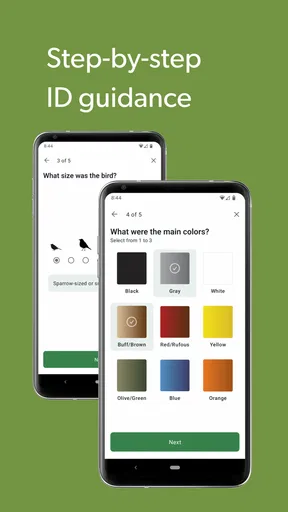
When I cannot take a useful photo or record a clean sound, I start with the question flow. The app asks about practical observations such as where I saw the bird, its size, and visible colors or patterns. This is much less intimidating than trying to translate a vague impression into a search phrase. I might not know a bird’s family, but I can usually decide whether it was smaller than a crow, whether it had a strong eye line, or whether it was moving around the ground.
The important habit is to answer from what I actually saw rather than what I expect to see in that location. A bird that looks mostly gray in poor light should not be forced into a brighter color category because a familiar species comes to mind. Merlin is helpful when I treat the questions as observations, not a quiz. If I am uncertain, I use the least specific answer available rather than narrowing the results too aggressively.
After the questions, I do not stop at the first suggestion. I compare the candidate photos, range information, and descriptions with the original sighting. The app is excellent for producing a manageable shortlist, but the final decision still benefits from my own attention. Size can be deceptive, lighting can hide markings, and a bird may be outside the place where I usually expect it. Merlin reduces the search, while I remain responsible for checking whether the result makes sense.
Photo identification works best with an intentional picture
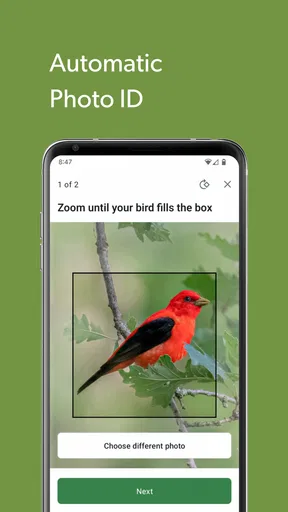
The photo tool is particularly useful when I can pause long enough to frame the bird. I get better results when the subject fills a reasonable part of the image and the important features are not blocked by branches. A distant, blurry bird may still produce suggestions, but I treat those suggestions as clues rather than a firm identification.
One practical trick is to take more than one photo when the bird remains in view. A side view may reveal the bill and wing pattern, while a front view can show the face or breast. I do not need to photograph every angle obsessively; I simply try to capture a second view when the first one hides the feature that separates similar species. This makes the app more useful as a learning aid because I can compare what I noticed with what the reference material emphasizes.
There is also a trade-off between speed and quality. Taking out the phone can make me miss the bird, especially with a fast-moving warbler or a bird that is already leaving. In those cases, I prefer to watch first and identify later from memory, sound, or a rough description. Merlin is most helpful when it supports the observation rather than replacing it.
Sound identification changes the way I pay attention
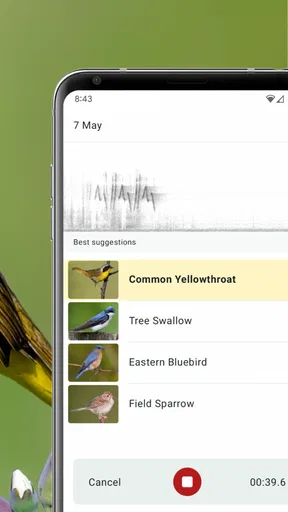
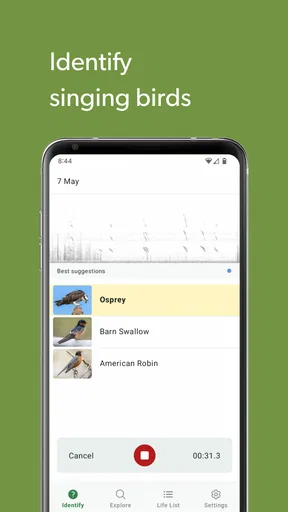
Song ID is the feature that most changed my everyday birding. Before using it, I often heard a call as background noise. With the recorder running, I started noticing repeated phrases, short chips, and birds hidden in dense vegetation. The app can turn an invisible bird into a realistic identification candidate, but the result is only as good as the recording environment.
I get more useful results when I move away from loud roads, running water, conversations, and strong wind. I also avoid talking over the recording. A clean stretch of sound is more valuable than a long recording full of handling noise. If several birds are calling at once, I listen again and try to connect the suggested species with the direction and rhythm I heard, rather than assuming the most prominent result must be correct.
Sound ID is not a replacement for learning songs. I use it as a confirmation tool: first I listen, then I make a guess, and only afterward do I check Merlin. That order helps me build recognition instead of becoming dependent on the phone. It is also worth remembering that a recording can contain more than one species, and background sounds can make an otherwise plausible result misleading.
What I check before heading outside
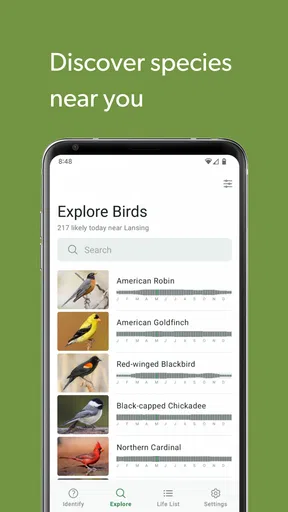
Merlin becomes smoother when I prepare before a walk instead of waiting until I am standing under a tree with a weak signal and a moving subject. I make sure the relevant bird information is ready for the area I plan to visit, then I open the app once before leaving. That small check prevents the frustrating situation of trying to set everything up while the bird is calling nearby.
I also keep the phone accessible rather than buried in a bag. This sounds obvious, but identification is time-sensitive. A camera tool is far less useful if I need to unlock the phone, search through several screens, and adjust settings while the bird flies away. My preferred routine is simple: observe first, open Merlin only when I have a reason, and return my attention to the surroundings immediately after checking.
Settings worth checking for a calmer experience
The first setting decision is whether I want to use the camera, the sound recorder, or the guided questions as my default habit. I do not treat one method as universally superior. In a quiet garden, sound can reveal birds I cannot see. In an open park with good light, a photo may be faster. In a brief encounter, the question flow may be the safest option because it does not depend on a perfect recording or image.
Location is another part of the setup that deserves attention. Merlin’s suggestions make more sense when the selected place matches where I am actually birding. If I am visiting a different region, I check that the app is working with the right local context rather than relying on an old selection from a previous walk. This is especially important when similar-looking species occur in different areas.
I recommend checking the bird information available for the places I visit regularly. Preparing it at home is more comfortable than doing it outdoors, and it gives me a repeatable routine for familiar parks, gardens, or travel destinations. I do not prepare every possible location; I focus on the places I genuinely expect to explore. That keeps the app easier to navigate and avoids turning preparation into a project of its own.
Permissions also affect the experience. If I want to take a photograph, the app needs access to the camera. If I want to record a song, it needs access to the microphone. I review those choices in the phone’s settings when something does not work as expected, rather than assuming the identification feature itself is broken. This is a small but useful distinction for anyone setting up the app for the first time.
Shortcuts that make repeat visits faster
Experienced use is less about pressing every feature and more about repeating a sensible sequence. On a familiar morning walk, I begin with a short period of listening before opening the app. If I hear a distinctive call, I use sound identification. If I see movement but cannot hear anything clearly, I switch to the camera. If both fail, I use the questions while the memory of the bird is still fresh.
I also keep a mental note of the feature that made me uncertain. Was it the tail shape, the wing bars, the call pattern, or the bird’s size? That question tells me which Merlin result details deserve the closest comparison. Instead of scrolling through every possible candidate, I focus on the one or two traits that can actually separate the likely species.
For a family outing, I use Merlin differently. I let another person describe the bird and enter the answers together, even when I already have a guess. This turns identification into a shared observation exercise. Children and beginners can contribute meaningful details without needing to know bird names first, and the app gives the group a common way to discuss what was seen.
For a quick backyard check, I avoid opening the app for every familiar bird. I use it for the unusual visitor, the unfamiliar song, or the species I want to learn. That selective approach keeps identification from becoming a distraction and helps me remember the discoveries that mattered. The app is strongest when it supports curiosity, not when it becomes a compulsory step for every bird.
Where the app needs human judgment
Automatic identification can sound more certain than the situation deserves. A blurry photo, a quiet recording, or a bird partly hidden by leaves gives the system limited evidence. I never treat a single suggestion as proof when the observation was weak. I compare the result with the bird’s shape, behavior, habitat, and voice, and I look at alternatives when the match feels questionable.
Sound is particularly vulnerable to confusion. Similar calls can occur among related species, and a recording may capture a bird that I did not notice visually. Wind, traffic, insects, and other birds can also affect the result. If Merlin suggests a species that does not fit the sound I heard, I repeat the recording from a better position or return to the question-based method rather than forcing an answer.
Photo identification has its own limits. A bird photographed from below may hide the markings that matter most, while harsh sunlight can change how colors appear. A phone camera can also make a small bird look larger or flatter than it really is. I find the tool most reliable when I use it alongside the reference images and descriptions, not as a one-tap authority.
The app is less suitable for someone who wants a deep academic reference first and an identification assistant second. Merlin gives me a friendly route into birding, but a dedicated field guide may still be better for studying fine plumage differences, detailed taxonomy, or regional variation over a long session. I also would not choose it as my only tool if my main interest is keeping highly structured research notes. Its value is focused on recognizing and learning birds in the moment.
How it compares with ordinary birding alternatives
A printed field guide has one major advantage: it does not need a charged phone, and browsing pages can encourage careful comparison. It is also satisfying for someone who already understands bird families and wants a broad reference beside them. Merlin is quicker for a beginner because it starts with observations rather than requiring knowledge of where to begin in a book.
General image-search tools are useful when I already know the likely name and want more pictures, but they are awkward when all I have is a vague memory. Merlin is built around the reverse problem: I have the bird, but not the name. The guided questions and bird-focused results make that process much less random.
Birdsong websites and recordings can be excellent for focused study, especially when I want to practice one species repeatedly. Merlin is more convenient during a walk because it connects listening with identification. The compromise is that I still need to verify difficult cases and spend time learning the sound beyond the app’s suggestion.
For beginners, I think Merlin offers the best balance of assistance and discovery among these usual alternatives. For advanced birders, it is more valuable as a fast second opinion than as a complete replacement for personal knowledge and specialist references. That distinction is important: the app can make me faster without making me infallible.
Who should install it, and who may prefer something else
I recommend it to anyone who has started noticing birds but feels blocked by names. It is also a strong choice for families, casual walkers, gardeners, travelers, and photographers who want a practical way to investigate a sighting. Because it supports questions, pictures, and songs, it adapts well to different levels of experience and different kinds of encounters.
It is less compelling for someone who already identifies local birds confidently and does not want phone assistance outdoors. A serious observer may prefer a specialized reference, a notebook-centered routine, or a separate recording workflow. People who spend most of their time in places with poor connectivity should prepare before going out and should still carry a backup identification method.
The app is free, which removes the biggest barrier to trying it. It is rated for Everyone, and the current version is 4.1, with support for Android 7.0 and later. Those details make it accessible to many existing phones, though the practical experience will still depend on the device’s camera, microphone, battery, and available storage.
My verdict after building a regular habit
Merlin Bird ID works because it does not assume that every birding moment looks the same. I can begin with a question, switch to a photo when the bird settles, or use sound when the bird stays hidden. The best results come from combining those options with a repeatable habit: observe carefully, choose the method that matches the evidence, and verify the suggestion instead of accepting it automatically.
My favorite use is the ordinary one: hearing an unfamiliar call on a walk, recording a clean sample, checking the likely identity, and then listening again with the bird’s pattern in mind. That turns a fleeting sound into something I can learn. The app does not remove the need for patience, good observation, or a proper reference when the case is difficult, but it makes the first step much easier.
After trying its different workflows, I see it as more than a name-finding utility. The real strength is the habit it encourages: notice a detail, test an idea, and use the result to look and listen more carefully next time. For a free Books & Reference app from Cornell Lab of Ornithology, that is a genuinely useful role. I would install it for a beginner without hesitation, and I would recommend it to experienced birders as a convenient field companion, provided they keep their own judgment in charge.
Privacy and Permissions
See what permissions an app requests and how it handles your data.
- Identity
- find accounts on the device
- Contacts
- find accounts on the device
- Location
- approximate location (network-based), precise location (GPS and network-based)
- Phone
- read phone status and identity
- Photos/Media/Files
- read the contents of your USB storage, modify or delete the contents of your USB storage
- Storage
- read the contents of your USB storage, modify or delete the contents of your USB storage
- Microphone
- record audio
- Wi-Fi connection information
- view Wi-Fi connections
- Device ID & call information
- read phone status and identity
- Other
- view network connections, pair with Bluetooth devices, access Bluetooth settings, change network connectivity, connect and disconnect from Wi-Fi, full network access, run at startup, prevent device from sleeping, modify system settings
Verdict
Strengths of Merlin Bird ID by Cornell Lab
- Excellent for identifying birds from photos, sounds, or descriptions.
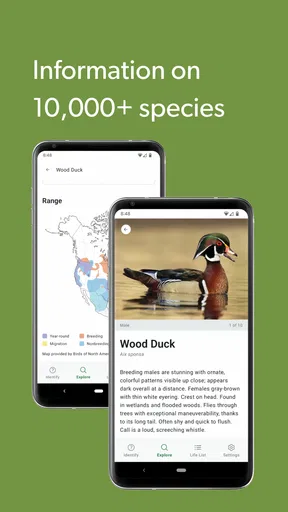
- Covers a vast number of species worldwide with detailed profiles.
- Step-by-step questions help beginners narrow down an identification.
- Sightings can be saved and organized in personal birding lists.
- Backed by trusted scientific data from Cornell Lab of Ornithology.
Limitations of Merlin Bird ID by Cornell Lab
- Some advanced features work best with an internet connection.
- Audio identification can struggle with noisy or overlapping bird calls.
- Species coverage and accuracy may vary by region.
- The app may use considerable storage for downloaded bird packs.
- Results can feel overwhelming when several similar species are suggested.
Other Releases by Cornell Lab of Ornithology
View All
eBird by Cornell Lab
Books & Reference3.8
Similar Picks in This Category
View All
Google Play Books & Audiobooks
Google LLC4.7

네이버 - NAVER
NAVER Corp.3.5

Wattpad - Read & Write Stories
Wattpad.com3.7

King James Bible - Verse+Audio
Ozion4.8

Bible Offline-KJV Holy Bible
Bíblia Offline4.9

Amazon Kindle: Reading App
Amazon Mobile LLC4.8
Frequently Asked Questions
What is Merlin Bird ID by Cornell Lab, and what can it identify?
Merlin Bird ID is a bird-identification app developed by the Cornell Lab of Ornithology. It can help identify birds from photos, recorded songs, calls, and answers to a guided set of questions about appearance, location, and behavior. Results are generally strongest for common species and supported regions, while unusual birds, poor recordings, blurry images, or difficult lighting may require manual verification.
Does Merlin Bird ID work without an internet connection?
Yes, Merlin can be used offline if you download the appropriate regional bird packs and sound-identification resources in advance. This is especially useful for hiking, traveling, or birdwatching in areas with weak mobile coverage. Offline availability depends on the species pack and features installed, so it is worth preparing downloads before leaving home and keeping enough storage space available.
Is Merlin Bird ID free to download and use?
Merlin Bird ID is generally available as a free app for Android and iPhone, with no standard subscription required for its main identification tools. Some features depend on free regional bird packs or sound packs that must be downloaded separately. Normal mobile-data charges may apply when downloading packs, synchronizing observations, or using online features away from Wi-Fi.
How accurate is Merlin Bird ID’s photo and sound recognition?
Merlin can be impressively helpful, particularly when the bird is clearly visible or the recording contains a clean, recognizable song. However, it should be treated as an assistant rather than an unquestionable authority. Similar species, background noise, distant calls, seasonal plumage, young birds, and incomplete photos can produce uncertain or incorrect suggestions, so compare the result with the app’s details and other field references.
What permissions and personal data does Merlin Bird ID require?
Depending on the features you use, Merlin may request access to your camera, microphone, photos, location, and device storage. These permissions support photo identification, sound recording, regional species suggestions, and saving observations. You can usually manage them through Android or iOS settings, but limiting access may disable certain tools. Review the app’s current privacy information before creating an account or sharing observations.
